For editors, colorists and designers · Mac & Windows

Every job gets a home.

Nest makes the folders, the job code and the DaVinci Resolve project for a new job in one click. Then it remembers where every one of them lives.

Download for Mac Windows US$39 once · no subscription · no account
Try it · type a project name Example data, not a real job
Nest

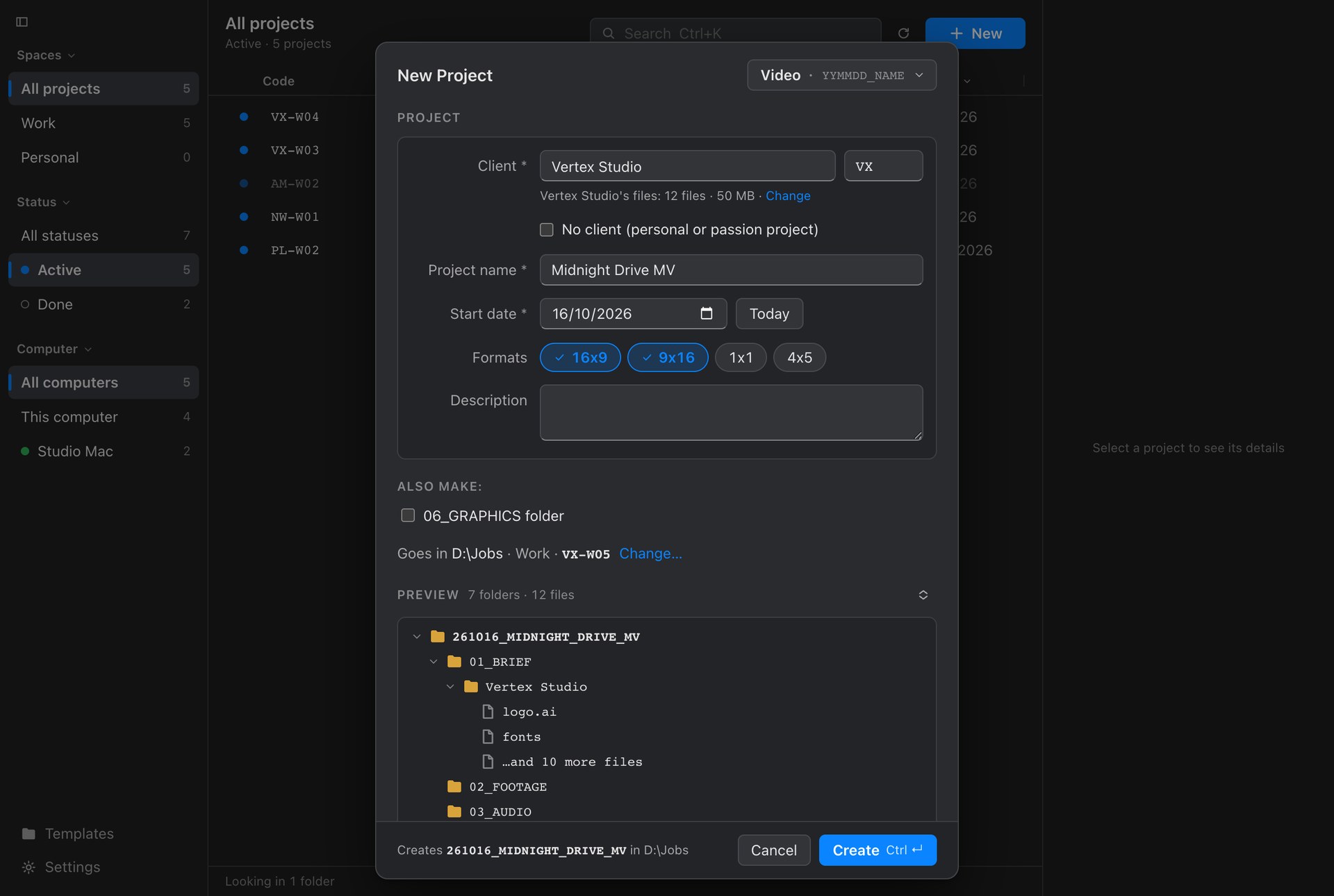
New Project

Goes in /Volumes/Work/Jobs · Work · VX-M05

Preview

    Job codeVX-M05
    What you see is exactlywhat gets made.
    Created VX-M05Open folder
    The old way
    Copy the template folder.Paste.Rename.Rename the subfolders.New Resolve project.Drive, folder, folder, folder.

    It worked. It was just a hassle, every single job. Nest does all of it in the time it takes to type a name.

    How it works

    Three steps. Then you're working.

    1. 01

      Pick a template.

      Video, Design, Photo shoot, or one you made from a job folder you already like.

    2. 02

      Answer three questions.

      Who's paying, what it's called, when it starts. Nest shows the folders before it makes them.

    3. 03

      Create.

      Folders, starter files, a job code, and a Resolve project already named and filed. Open it from Nest in one click.

    What's inside

    Small things that save the same ten minutes, every job.

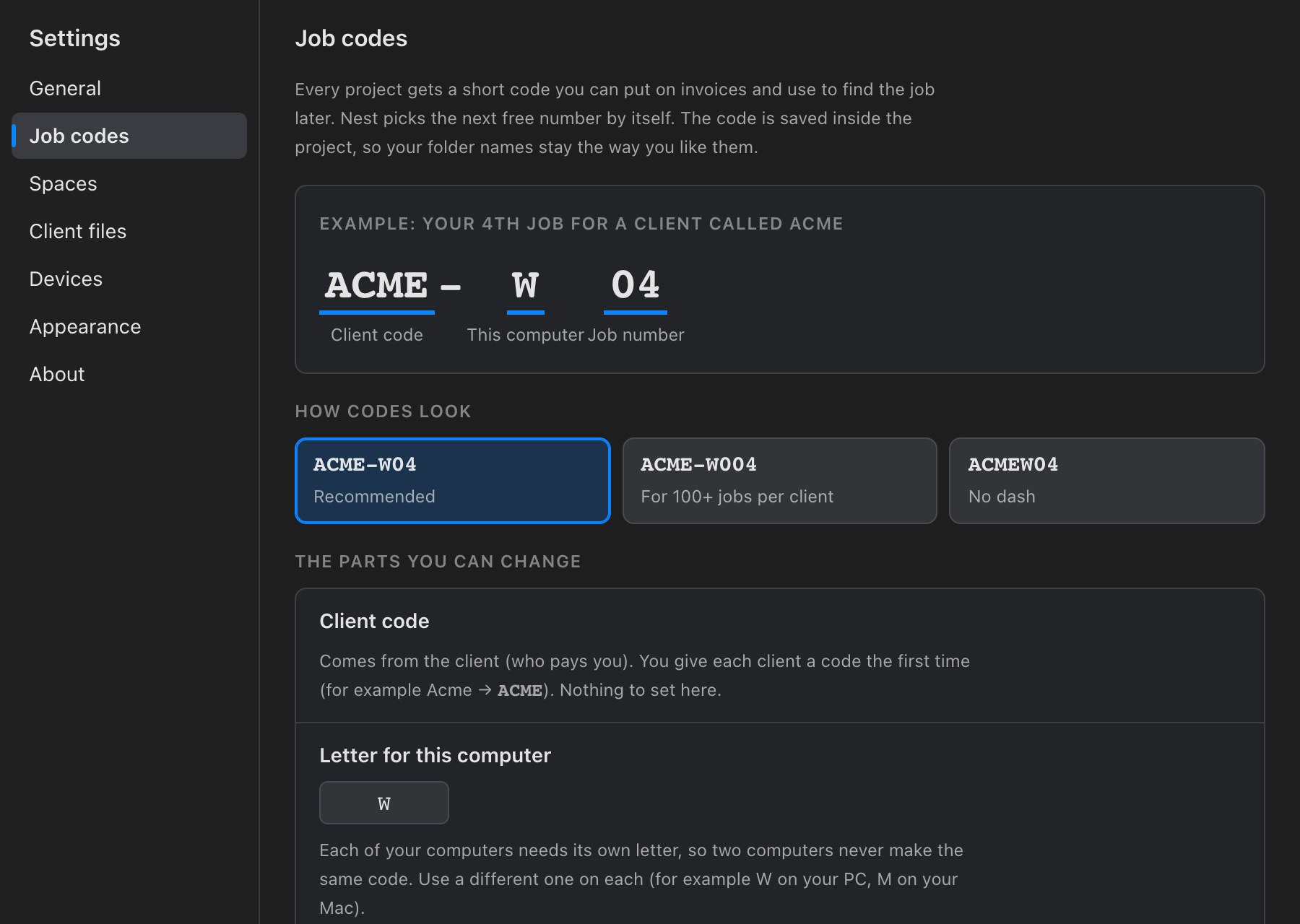
    Job codes

    A short code for every job. You never pick the number.

    ACMEWho pays you
    –
    WThis computer
    04Next free number

    Put it on invoices, say it on calls, search by it later. It's saved inside the project, so your folder names stay the way you like them.
    DaVinci Resolve Studio

    A Resolve project, already there.

    Give a template a starter project. Each new job gets its own copy in Resolve, named after the job and filed under the client. Resolve closed? It goes in the next time Resolve opens.

    StarterGrading MV.drp
    Goes intoLocal Database › Vertex Studio
    Name261021_MIDNIGHT_DRIVE_MV
     ● Added to Resolve
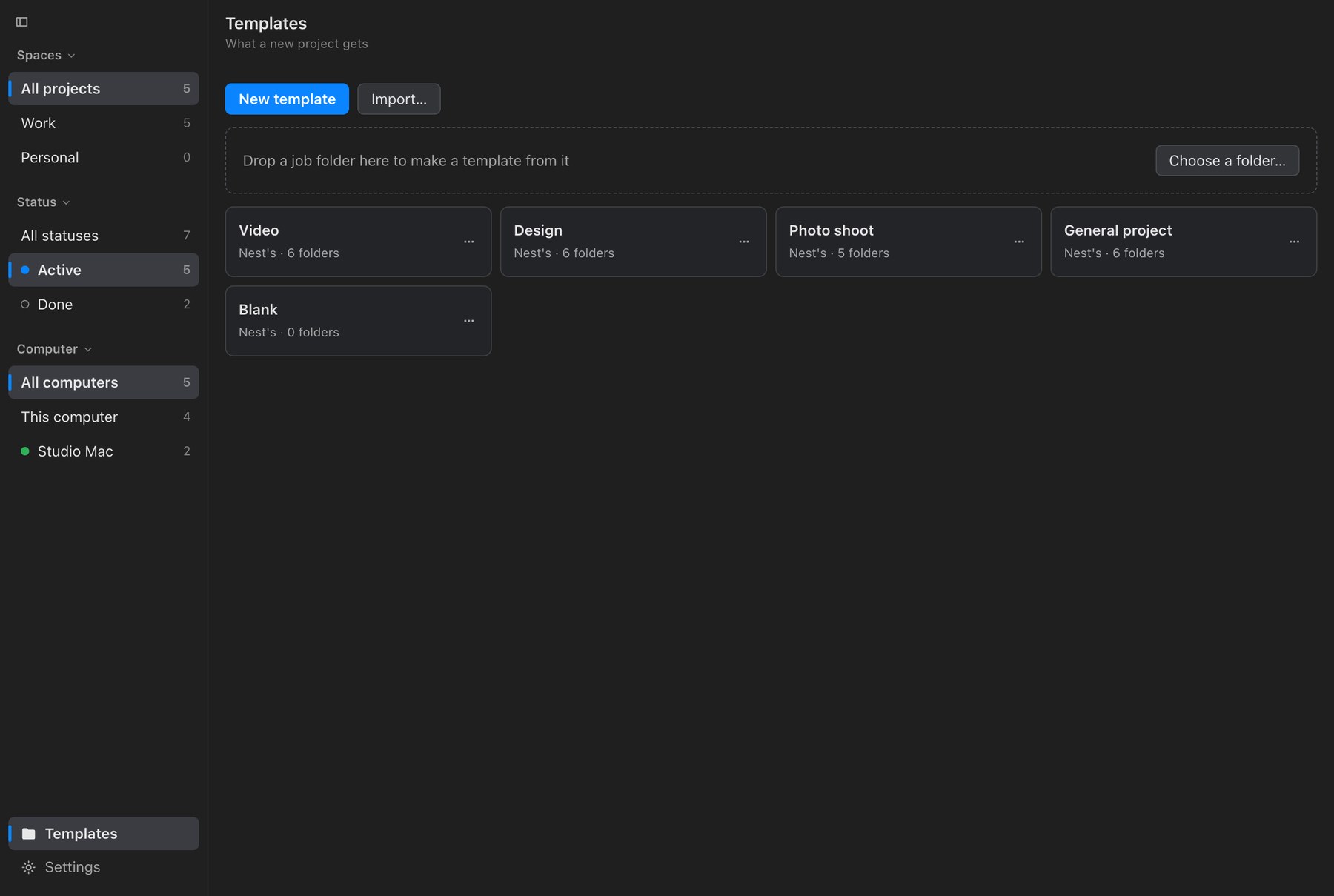
    Templates

    Start from the folder you already copy.

    Drop a past job in. Nest keeps the folders, leaves footage and anything over 100 MB behind, and turns the old job's names into blanks it fills in next time.

    Drop a job folder here
    Two computers

    Know where a job is before you look.

    Each computer gets its own letter, so two machines never make the same code. Nest shows which jobs are on which computer and keeps your templates the same on both, through the Google Drive, Dropbox or NAS folder you already use.

    WStudio PC
    ⇄
    MMacBook Pro
    Client kits

    Their logos and fonts come along.

    Keep each client's brand files in one folder. Every new job for them gets a copy, in the folder your template picks. New Project shows the size first.

    01_BRIEF/Vertex Studio
    logo.ai · fonts · 10 more
    Sizes

    See what's heavy before it goes to the archive.

    Sizes per folder and by file type. Clear out what you don't need, then Archive moves the job to your archive folder in one go.

    02_FOOTAGE1.8 TB
    04_PROJECT212 GB
    05_EXPORTS96 GB
    01_BRIEF50 MB
    Menu bar & tray

    One click away, even with the window closed.

    Close the window and Nest stays in the menu bar (on Windows, by the clock). Start a project or jump into a recent one from there.

    Nothing goes online.

    No account, no sign-in, no tracking. It works on a plane and in a locked-down suite.

    Never deletes your work.

    Nest makes folders. It never deletes or overwrites what's inside your projects.

    The folder is the truth.

    Each job carries a small hidden file with its details. Rename or move a job inside your jobs folder and Nest still finds it.

    Feels like it came with your computer.

    Your system font, light or dark, the shortcuts you expect, and a real menu bar on the Mac.

    ScreensDrag →

    Quiet on purpose. Your work is the loud part.

    Nest New Project: client, project name, formats, Also make and a preview of the folders
    ANew Project. Folder name and job code worked out before anything is made.
    Nest settings explaining job codes: client code, a letter for this computer, job number
    BJob codes, explained in plain words.
    Nest Templates: drop a job folder to make a template, and the templates as cards
    CTemplates. The folders and questions every project starts with.
    Pricing

    Pay once. Keep it.

    Nest

    $39USD · one time
    • Mac and Windows
    • Every v1 update included
    • Unlimited projects
    • Resolve Studio starter projects
    • Works fully offline
    • No account, no subscription
    Buy Nest macOS 13+ · Windows 10/11 · Demo: checkout not connected

    Already making folders for free?

     Copy & pasteNest
    Folders from a template●●
    Names filled in for you—●
    Job codes—●
    Resolve project made—●
    Find any job in one click—●
    Two computers, no clashes—●

    Making folders was never the hard part. Keeping track of them was.

    Questions
    Does Nest need the internet or an account?

    No. Nest runs entirely on your computer. The only time it reaches out is to check for an update. No sign-in, no tracking.

    Will it touch my existing projects?

    Nest never deletes or overwrites anything in a project. It only moves a job when you press Archive, and then in one move on the same drive. It finds the jobs it made inside your jobs folder, even after you rename them.

    Which version of DaVinci Resolve does it work with?

    Starter projects need DaVinci Resolve Studio, because only Studio lets other apps talk to it (Preferences → System → General → External scripting: Local). Tested with Resolve Studio 21.1. Resolve is optional: everything else works without it.

    I use a Mac and a PC. Does that work?

    Yes, that's what it was built for. Each computer gets its own letter in the job code, so the two never clash. Point both at the same Google Drive, Dropbox or NAS folder and Nest shows which jobs are on which computer and keeps your templates the same.

    Will Windows warn me when I install it?

    The Mac app is signed and checked by Apple, so it opens without a warning. On Windows, SmartScreen may ask first: click More info, then Run anyway.

    Can I use my own folder structure?

    Yes. Drop a job folder you already use and Nest turns it into a template. Or edit one of the built-in ones: Video, Design, Photo shoot, General and Blank.

    Is it a subscription?

    No. US$39 once, with every v1 update included.

    Stop copying the template folder.

    Nest by INTRVL. For people who start a lot of jobs and want to find them again.